
GSJP Airport Handlersは現在ベータ版の段階にあります。
ご意見やご感想は、ぜひGSJP DiscordやGithub Issuesでお寄せください。
GSJP Airport Handlers are currently under beta stage.
Please provide opinions and thoughts on GSJP Discord/Github Issues.
既知の不具合 Known Issue
上空でSPOTを選択した場合、Handlerの一部の機能が正常に動作しないことが確認されています。
If preselecting stand in air, some functionalities of the handler will not work.
正しく動作させるために、着陸後、一度GSXを再起動していただくようお願いいたします。
Please restart GSX after you landed to allow proper handler functionality.
- 導入ガイド Installation Instructions
- はじめに Introduction
- 共有ライブラリバージョン一覧 Shared Library Versions
- 共有ライブラリの説明 Shared Library Description
- Automatic GSX Profile (.ini/.py) Fetcher
- Mototok Behavior Handler: 使用可否チェック Usability Check
- Mototok Behavior Handler: Mototok早期接続の無効化 Disable Early Connect
- Mototok Behavior Handler: GSJP Mototokリペイントの自動選択 Auto-Livery
- Auto Operator Selector
- Model Disabler
- Japanese VDGS Display: 汎用表示 Generic Display
- Japanese VDGS Display: TSAT
導入ガイド Installation Instructions
- すべてのGSJP Airport Handlerには共有ライブラリが必要です。
https://github.com/GroundServicesJP/GroundServicesJP_GSXProfiles/tree/main/lib からすべてインストールし、%APPDATA%\Virtuali\Handlers\libに置いてください。 - 各空港用Handler(
_handler.pyで終わるファイル)を%APPDATA%\Virtuali\GSX\MSFSにインストールしてください。 - Airport Handlerを更新する際は、GitHubから共有ライブラリを再インストールすることを強く推奨します。
- All GSJP Airport Handlers required shared libraries. Please install everything under
https://github.com/GroundServicesJP/GroundServicesJP_GSXProfiles/tree/main/lib
at%APPDATA%\Virtuali\Handlers\lib. - Then, install respective airport handler (file trailing with
_handler.py) at%APPDATA%\Virtuali\GSX\MSFS. - If updating airport handler, reinstalling shared libraries from Github is recommended.
例として、RJFS(SNJSIM)のプロファイル(.iniおよび.pyファイル)とHandlerをインストールする手順を説明します。
For example, to install RJFS (SNJSIM) Profile (.ini/.py) and Handler:
- 共有ライブラリ Installation of Shared Library
%APPDATA%\Virtuali\Handlers\libには、以下のファイルが含まれている必要があります。gsjp_auto_profie_fetch_v1.pygsjp_model_disabler_v1.pygsjp_mototok_handler_v1.pygsjp_operator_correlation_v1.py
- プロファイル (.ini/.py) Installation of Profile (
.ini/.py)%APPDATA%\Virtuali\GSX\MSFSには、以下のファイルが含まれている必要があります。rjfs-snjsim.inirjfs-snjsim.pyrjfs-snjsim_handler.py
はじめに Introduction
GSX Version 3.8.2以降では、Airport Handlerが導入され、以下の機能が実現可能になります。
.py/.iniプロファイルの自動更新(handlerスクリプトは除く)- よりリアルなGSE車両の挙動
- 航空会社に応じたGHオペレーター(業者)の自動選択
- 日本ではあまり見られない一部GSE車両の無効化
- カスタムVDGS表示
- ……
Starting with GSX Version 3.8.2, with the induction of Airport handlers, we can implement the following features:
- Auto-updating
.py/.iniprofiles (handler scripts cannot be updated automatically) - More realistic ground vehicle behaviors
- Operator auto-selection based on current airline
- Disablement of ground vehicles not seen in Japan
- Customized VDGS Display
- ……
GroundServicesJP(GSJP)は、全GSJP空港に対応したAirport Handlerの提供を目指しています。
GroundServicesJP(GSJP) is working to provide an airport handler for all GSJP airports.
共有ライブラリバージョン一覧 Shared Library Versions
| ライブラリ Library | バージョン Version | 備考 Notes |
|---|---|---|
Automatic GSX Profile (.ini/.py) Fetcher | 1.0 | 廃止 Discontinued |
| Mototok Behavior Handler | 1.0 | |
| Auto Operator Selector | 1.0 | |
| Model Disabler | 1.0 | |
| Japanese VDGS Display | N/A | 非共有ライブラリ構成。各Handlerスクリプト内に個別のロジックとして実装します。 Not a shared library, implemented in individual scripts. |
共有ライブラリの説明 Shared Library Description
Automatic GSX Profile (.ini/.py) Fetcher
対応(予定)空港 (Planned) Supported Airports
全GSJP空港 All GSJP Airports 廃止 Discontinued
説明 Description
このライブラリは、プロファイルを自動的に取得します。これにより、ユーザーが手動でプロファイルを更新する必要はなくなります。
This shared library handles automatic profile fetching, such that user will not need to update the profiles manually.
仕様 Behaviors
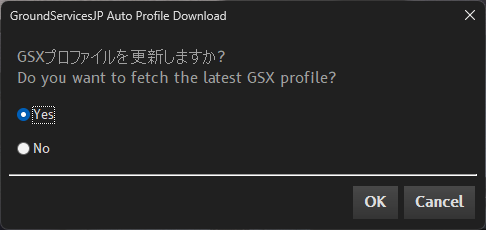
ユーザーが対象の空港シーナリーに入る際、GSJPプロファイルを更新するかどうかの確認メッセージが毎回表示されます。ユーザーがいずれかのオプションを選択することで、処理が進行します。
User will be asked everytime on whether they need to update a GSJP profile when they enter the airport scenery. The user must make a selection.
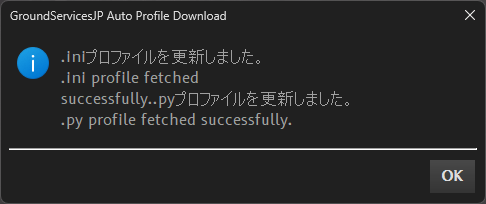
プロファイルの更新が行われた場合のみ、通知が送信されます。
通知が表示されない場合は、プロファイルが更新されていないことを示しており、以下のいずれかの理由が考えられます。
- 最新のプロファイルが既に適用されている(更新の必要がない)
- 更新に失敗した
Notifications are only sent when a profile update has occurred. If no notification is displayed, it indicates that the profile has not been updated, which could be due to one of the following
- There is no newer version available (the latest profile is already applied).
- The update failed.
警告 Warning
プロファイルを編集したい場合は、自動更新機能を無効にしてください。
機能を有効にしたままにすると、GSJPのGitHubから最新のプロファイルが自動的にダウンロードされ、行った編集内容がすべて上書きされてしまいます。
機能を無効にする最も安全な方法は、共有ライブラリまたはAirport Handlerを削除することです。
If you wish to customize the profile on your own, you must disable the auto-update function. Otherwise, the auto-update system will download the latest profile from the GSJP GitHub and overwrite your local changes.
The safest way to disable this feature is to simply remove the shared library or the airport handler.
Mototok Behavior Handler: 使用可否チェック Usability Check
対応(予定)空港 (Planned) Supported Airports
RJOO, RJFS, RJBB (対応予定 Planned)
依存関係 Dependency
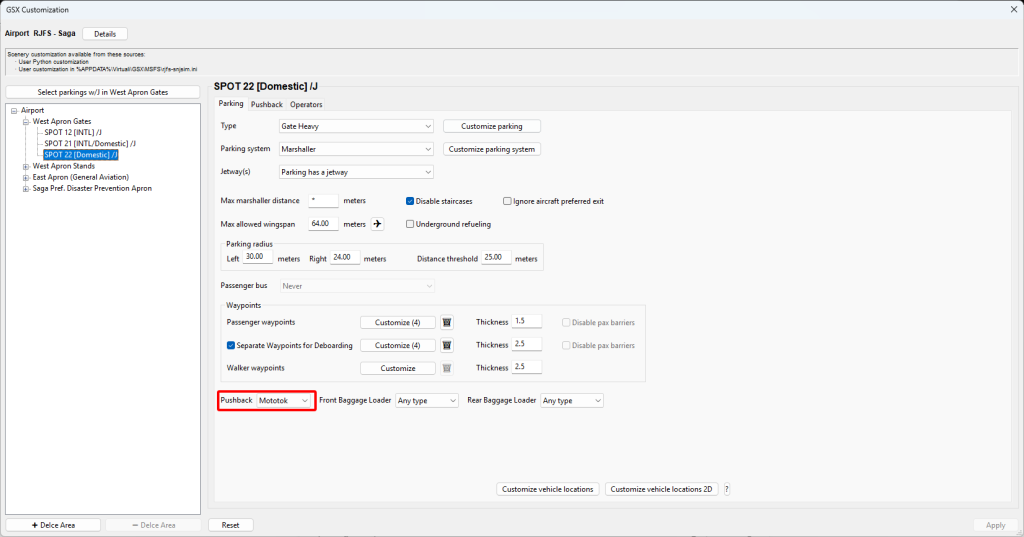
プロファイル設定にて、Mototokを選択する必要があります。
The user must select “Mototok” in airport profile.
説明 Description
日本の空港において、以下の条件を一つでも満たさない場合、Mototok 8600(NG) は使用されません。
- 95t (210,000 lbs)未満であること。
(8600NGは105tまでの牽引が可能ですが、システム上の制約および挙動の安定化のため、8600の95tに制限を統一しています。) - 以下の指定空港での運用に限ります。
- ANA (運航者): RJOOまたはRJFS
- JAL (運航者):RJOO
- CKTS (GH業者):RJBB
- 各オペレーターにおいて、以下の機種が適用されます。
- ANA (運航者):A320/A321/737
- JAL (運航者):737/ERJ
- CKTS (GH業者):ICAO ARC Code C以下
If any of the following conditions cannot be met, Mototok 8600(NG) should not be used at Japanese airports:
- If current aircraft total weight is below 95 ton or 210 klbs.
(8600NG can tow 105 ton, but due to technical difficulty, the limit is unified to 95 ton of 8600.) - The use of the Mototok is strictly limited to the following operator-airport pair.
- For ANA (Airline Operator), the operation must be at RJOO or RJFS.
- For JAL (Airline Operator), the operation must be at RJOO.
- For CKTS (Ground Handling), the operation must be at RJBB.
- The allowed aircraft type varys by operators:
- ANA (Airline): A320, A321, 737
- JAL (Airline): 737, ERJ
- CKTS (Ground Handling): ICAO Aerodrome Reference Code (ARC) of C or lower.
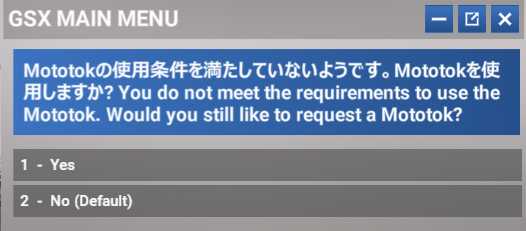
航空会社または機種が規定の条件を満たしていない場合でも、HandlerはMototokを使用するかどうかをユーザーに確認します。10秒以内に応答がない場合は、代わりにトーバー付きのタグ車が配備されます。
The handler will ask if the user would still like to use Mototok, even if the user may not satisfy condition 2 and 3 (overweight aircraft is not allowed to use Mototok 8600). If the user does not respond in 10 seconds, a towbar tug will be spawned.
Mototok Spacer 200はより重量のある航空機を牽引できますが、日本では使用されていません。
そのため、この共有ライブラリでは、対応空港においてMototok Spacer 200が生成されないように設定されています。
Although a Mototok Spacer 200 can tow heavier aircraft, they do not exist in Japan.
Therefore, with this shared library, Mototok Spacer 200 will never be spawned at supported airports.
Mototok Behavior Handler: Mototok早期接続の無効化 Disable Early Connect
対応(予定)空港 (Planned) Supported Airports
RJOO, RJFS, RJBB (対応予定 Planned)
説明 Description
Mototokが不必要に早く機体へ接続されるのを防ぎ、よりリアルなプッシュバック手順を再現します。
This shared library prevents the tug from connecting to the aircraft during boarding, ensuring a more realistic pushback sequence and avoid clashing with GPU.
Mototok Behavior Handler: GSJP Mototokリペイントの自動選択 Auto-Livery
対応(予定)空港 (Planned) Supported Airports
RJOO, RJFS, RJBB (対応予定 Planned)
依存関係 Dependency
GSJP Mototokリペイントが必要です。
GSJP Mototok Repaint is required.
https://flightsim.to/addon/105589/gsx-pro-japanese-ground-handling-repaint-mototoks
説明 Description
航空会社・GH業者に基づいて対応するMototokリバリーを自動的に選択します。
Mototokの使用可否チェック(RJOO/RJFSで対象外の航空会社を使用した場合など)を回避した場合、この機能は正常に動作しません。
This shared library selects the corresponding Mototok livery based off current airline or ground operator.
If the user bypassed Mototok usability check (e.g. using a non-applicable airline at RJOO/RJFS), this functionality will fail.
Auto Operator Selector
対応(予定)空港 (Planned) Supported Airports
全GSJP空港 All GSJP Airports
説明 Description
この共有ライブラリは、運用中の航空会社に基づいて、最適なオペレーター(GHおよびケータリング)を自動的にマッチングします。
これにより、ユーザーが手動でオペレーターを選択する必要はありません。
This shared library handles automatic operator (currently ground handling and catering) matching, based off current airline. The user will not need to update an operator manually.
仕様 Behaviors
GH車両の生成前(降機、搭乗、またはPBB操作などのオペレーションを選択した際)に、オペレーターを自動選択するかどうかの確認メッセージが表示されます。30秒以内に応答がない場合は、オペレーターが自動的に決定されます。
Before every vehicle generation (when user selects Deboarding/Boarding/Jetway/… operations), user will be asked on whether they would like to auto-select the operators. If no response is provided within 30 second, the operator will be automatically assigned.
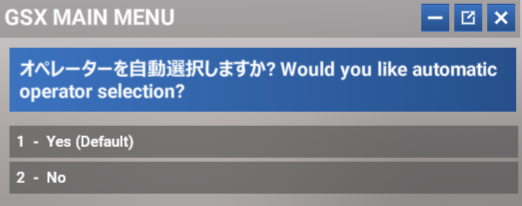
万が一、Handlerが自動的にオペレーターを特定できなかった場合は、通常のGSXオペレーター選択メニューが表示されます。
航空会社とオペレーターの関係テーブルは、GitHub上で更新されており、自動選択が行われるたびにHandlerによって最新情報が読み込まれます。
If the handler cannot find the operators automatically, the user will be able to use the standard GSX operation selection flow.
The airline/operator correlation table is updated dynamically on Github and pulled by handler in every auto-select session.
注意 Caution
GSXが使用中の航空会社を判別できない場合、オペレーターの自動選択が正常に行われません。
If GSX cannot deduct the airline you are flying, auto-operator selection will fail to correlate the correct operator.
Model Disabler
対応(予定)空港 (Planned) Supported Airports
全GSJP空港 All GSJP Airports
<対応空港で実際に運用されているGSE車両に基づいて決定されます。>
<Used depending on GSE Vehicle available to the airport in real life.>
説明 Description
この共有ライブラリにより、CCL35Sローダー/Neoplanバスの生成を無効化が可能になります。
The shared library provides disablement of CCL35S and Neoplan bus spawning.
Japanese VDGS Display: 汎用表示 Generic Display
対応(予定)空港 (Planned) Supported Airports
RJTT, RJAA (対応予定 Planned), RJCC (対応予定 Planned), RJGG (対応予定 Planned), RJOO, RJFF (対応予定 Planned)
説明 Description
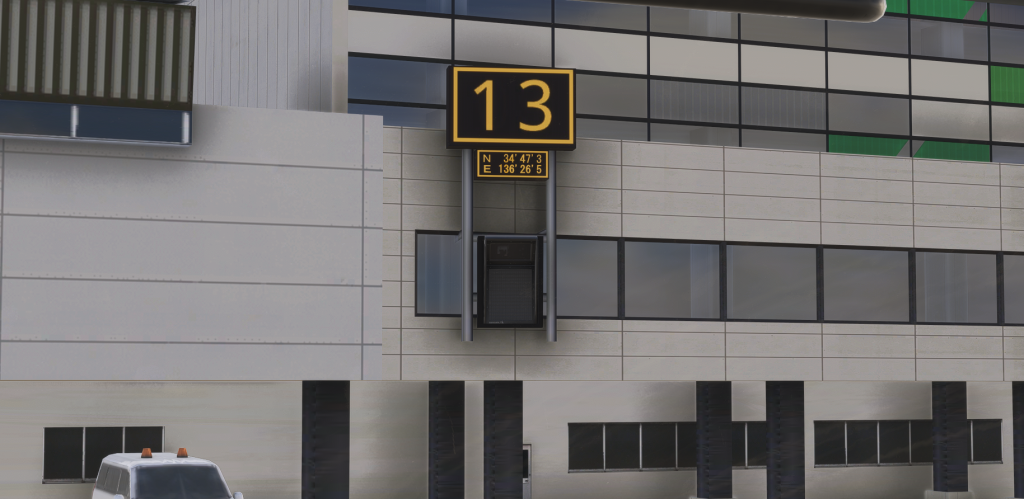
TSAT運用が行われていない空港、またはTSATデータが取得できない場合は、実際の運用に合わせて汎用の空白VDGS表示が表示されます。
When TSAT is not in operation or data is unavailable, the VDGS will remain blank, adhering to real-world operations in Japan.
Japanese VDGS Display: TSAT
対応(予定)空港 (Planned) Supported Airports
RJTT, RJAA (対応予定 Planned)
はじめに Introduction

TSAT表示機能は、オンラインのデータソース(現在はVATSIM FPLまたはSimbrief)を基に、AIPに記載されているとおりのTSAT表示を行います。
The TSAT display capability is derived from live online data sources (currently VATSIM FPL or SimBrief) and generates a TSAT readout that strictly adheres to the specifications outlined in Japan AIP.
TSATデータソース Data Sources
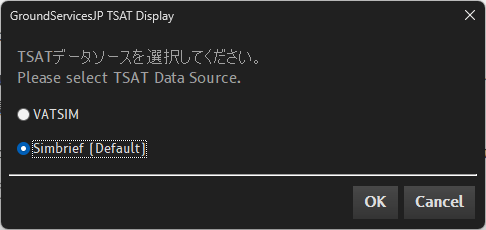
GH車両の生成前(降機、搭乗、またはPBB操作などのオペレーションを選択した際)に、TSATデータソースの選択画面が表示されます。
Before every vehicle generation (when user selects Deboarding/Boarding/Jetway/… operations), user will be asked on their preferred TSAT data source.
VATSIM FPL
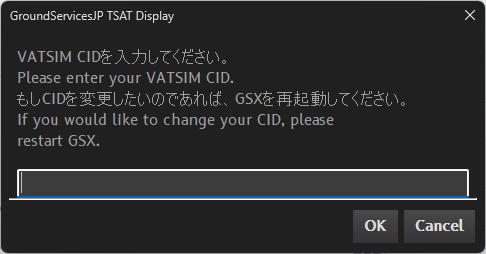
VATSIMのデータを利用するには、VATSIM CIDを入力する必要があります。
入力されたCIDをキーとしてVATSIMデータフィードを検索し、一致する飛行計画データを抽出します。
The user will need to input VATSIM CID to request VATSIM-based data.
The CID will then be used to query VATSIM traffic data to search for an flight plan.
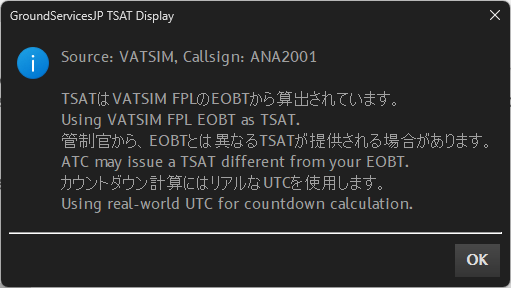
VATSIM FPLデータの取得に成功した場合、通知メッセージが表示されます。
If VATSIM FPL Data is successfully fetched, a message will appear.
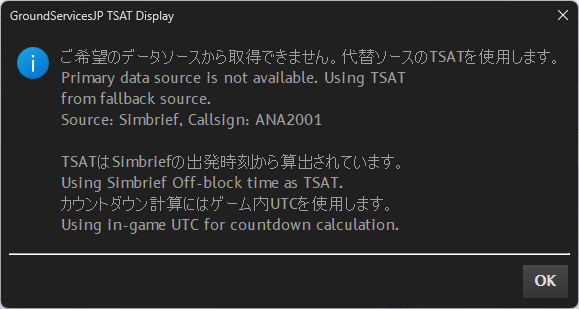
VATSIM FPLデータが取得できない場合は、代替としてSimbriefのデータが使用されます。
(なお、VATSIMデータはバックグラウンドで継続的に取得を試みており、データが確認され次第、通知メッセージが表示されます。)
If VATSIM FPL Data cannot be fetched, Simbrief data will be used instead.
(VATSIM FPL Data will be continually fetched, and a message will appear if VATSIM data source appears.)
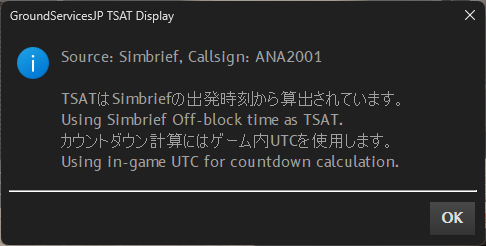
Simbrief
TSAT表示ルール Display Rules
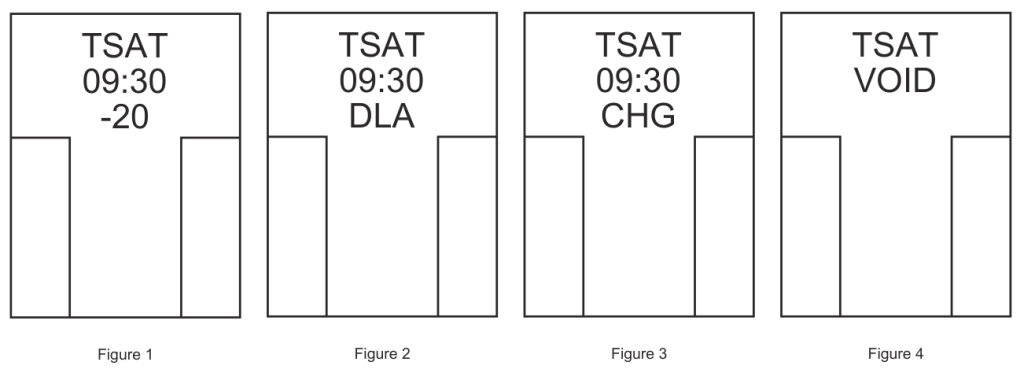
- TSATの20分前からVDGS表示により通知されます。
- 1行目に “TSAT” 表示が表示されます。
- 2行目にTSAT時刻が表示されます。
- 3行目にTSAT時刻から現在時刻のカウントダウン(分)が表示されます。(Figure 1)
- カウントダウンが0分を過ぎた場合には、30分間DLA表示となります。(Figure 2)
- TSATに変更がある場合には、3分間CHG表示となります。(Figure 3)
- TSATが失効する場合には、VDGS表示により通知されます。(Figure 4)
- TSAT is displayed on VDGS 20 minutes prior to TSAT.
- First Row: Four Character ‘TSAT’
- Second Row: TSAT Time
- Third Row: Countdown to TSAT in minutes (Figure 1)
- After countdown of 0, it is displayed as ‘DLA’ for 30 minutes. (Figure 2)
- When TSAT is changed, the third row becomes ‘CHG’ for 3 minutes and starts countdown. (Figure 3)
- When TSAT is voided, it is displayed on VDGS. (Figure 4)
カウントダウン(3行目)の表示内容 Countdown Display Logic
- 分表示:初期TSATおよびCHG表示3分経過後のTSATで、カウントダウンが-20~0分の場合
- DLA表示:初期TSATおよびCHG表示3分経過後のTSATで、カウントダウンが1~30分の場合
- CHG表示:ソースの変更またはTSAT更新によるTSAT変更が対象。表示は3分間保持。CHG中に新しいTSATが出た場合、CHGの3分カウントダウンはリセットされます。
- Minute display: For initial TSAT, or CHG has been displayed for more than 3 minutes and countdown within -20 to 0 minutes.
- DLA Display: For initial TSAT, or CHG has been displayed for more than 3 minutes, and countdown within 1 to 30 minutes.
- CHG Display: Displayed when source is changed, or TSAT is updated. The display is maintained for 3 minutes. If already in CHG display and a new TSAT appeared, the 3 minute countdown will reset.
汎用表示への切り替え条件 Conditions to Revert to Generic Display
- TSATの20分以上前、または30分以上経過したデータが取得された場合。
- 現在時刻がTSATの運用時間外 (羽田: 2120z ~ 1359z、成田: 2100z ~ 1130z) である場合。
- 取得されたTSATデータが正しくない(無効な)場合。
- すべてのデータソースからの取得に失敗した場合。
- When the countdown exceeds 20 minutes before or 30 minutes after the TSAT.
- When the current time is outside of TSAT operation time.
- When the fetched TSAT data is invalid or incorrect.
- When all data source requests fail.
エラーモード Error Modes
- VDGSに「RJTT GATE」と表示されている場合、handlerが正常に動作していません。
Couatl.logを確認してください。
- If VDGS displays “RJTT GATE”, it means that handler is not functioning. Please check
Couatl.log.